Aadhar Card Download
Your Trusted Guide to Aadhaar Services
Your Trusted Guide to Aadhaar Services
The Aadhaar card is one of the most essential identification documents in India, which is only issued by the Government of India through the Unique Identification Authority of India (UIDAI).
Each of the card contains a unique 12-digit number that acts as a valid proof of both identity and address for Indian residents.
Residents can download their Aadhaar card online through the official UIDAI portal. The digital copy, known as e-Aadhaar, is available as a password-protected PDF and is legally valid for identification. Users can download Aadhaar using their Aadhaar number, Enrolment ID (EID), or through services such as DigiLocker.
There are several ways to download Aadhaar card online. The most common methods include:
Indian citizens can easily download their e-Aadhaar through four official and convenient methods. Here’s a quick step-by-step guide for each one of these methods.
Note: Under the Aadhaar Act, your e-Aadhaar is just as legally valid as the physical card — it can be used across all government and private services.
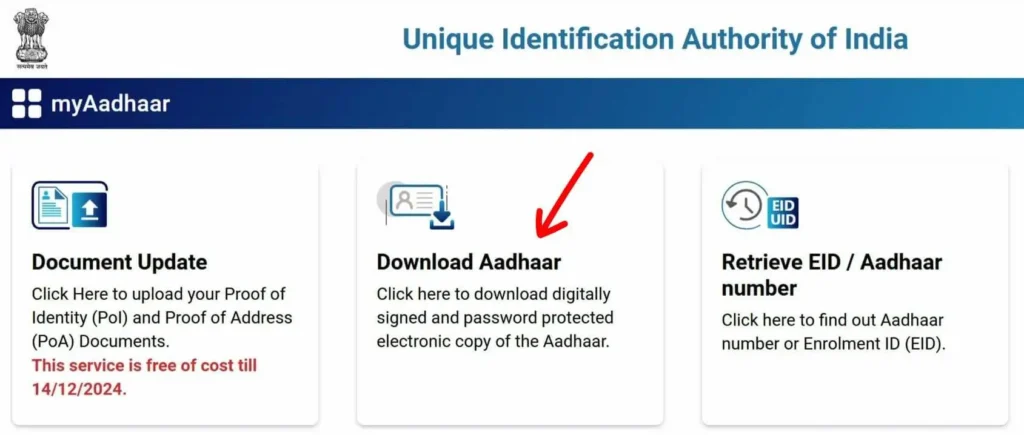
Now You Know: The EID, or Enrolment ID, is a 28-digit number you get when you first login at UIDAI and apply for Aadhaar — it helps you track your application status. Once your Aadhaar is approved, you’re assigned a 12-digit UID, also known as your Aadhaar number, which acts as your official proof of identity and address.
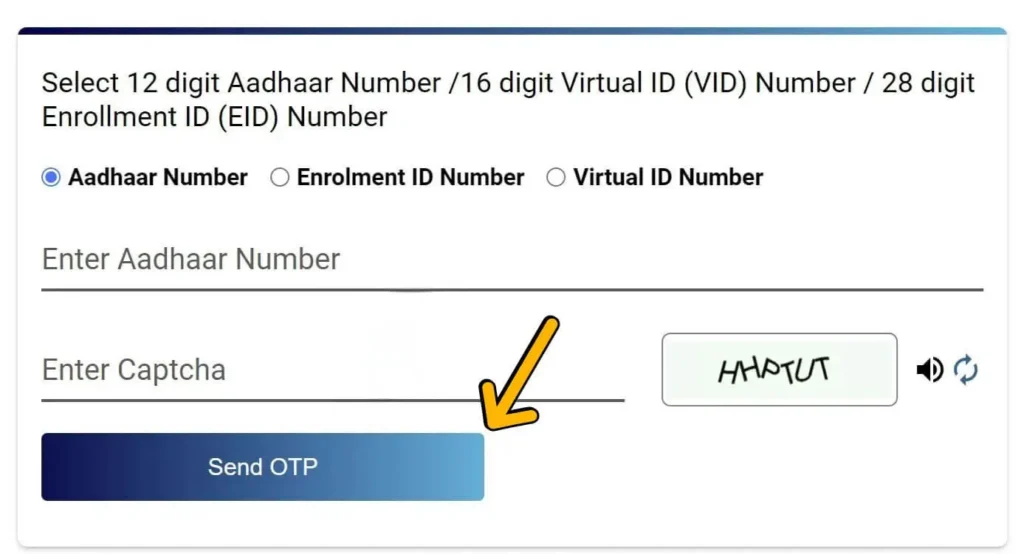
Note: If your mobile number isn’t linked to your Aadhaar, you’ll need to visit your nearest Aadhaar enrollment or service center to get it added or updated.
Tip: Use the “Retrieve Aadhaar/EID” tool if you’ve forgotten your details.
Downloading your Aadhaar through DigiLocker is a secure and paperless way to access your ID anytime, anywhere. It eliminates the need for carrying physical copies and ensures quick authentication at your fingertips.
Step 1: Log In to DigiLocker
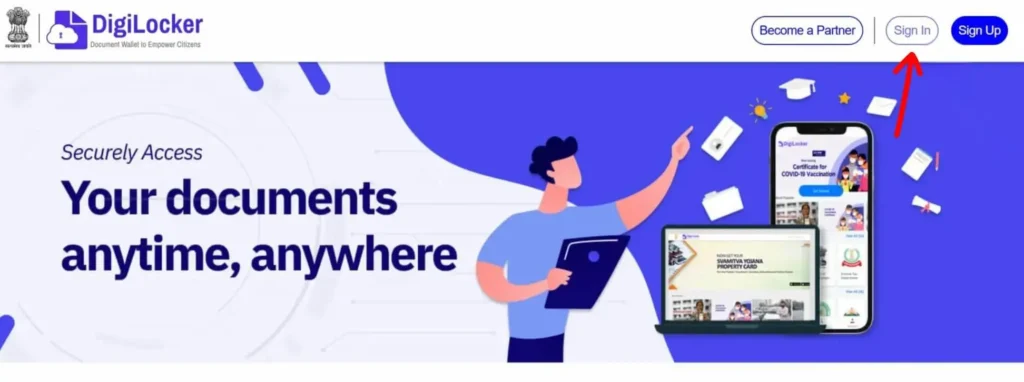
Note: If you haven’t signed up yet, you can create a DigiLocker account using your mobile number and email. The process is simple and takes just a couple of minutes.
Step 2: Search for Aadhaar Services
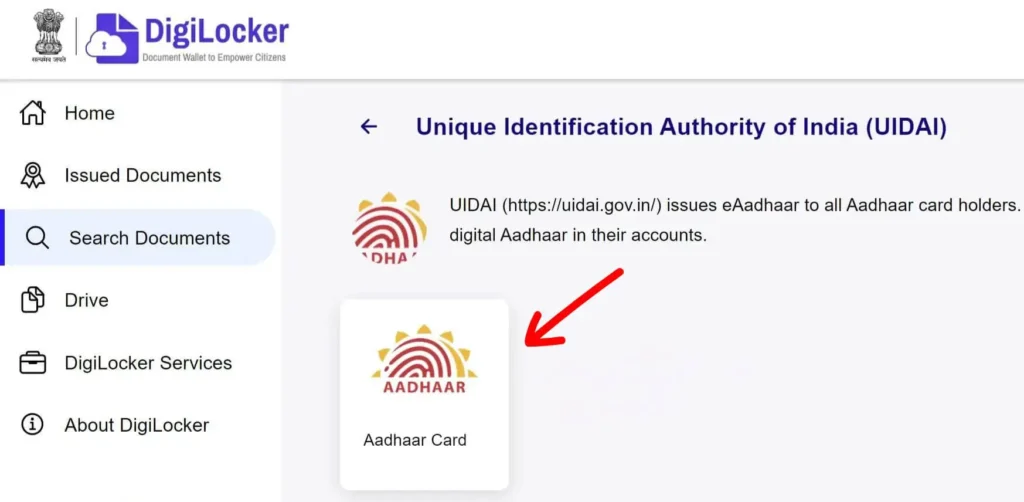
Step 3: Enter Your Aadhaar Details
Step 4: Retrieve Your Aadhaar
Step 5: Download Your Aadhaar Card
The mAadhaar app, developed by UIDAI, offers a secure and convenient way to access your Aadhaar anytime from your smartphone. Follow these steps to download Aadhar using the app:
Step 1: Install the mAadhaar App
Start by downloading the official mAadhaar app from your app store.
Step 2: Open the App and Register
Launch the app and begin the registration process.
Once verified, you’ll land on the main dashboard.
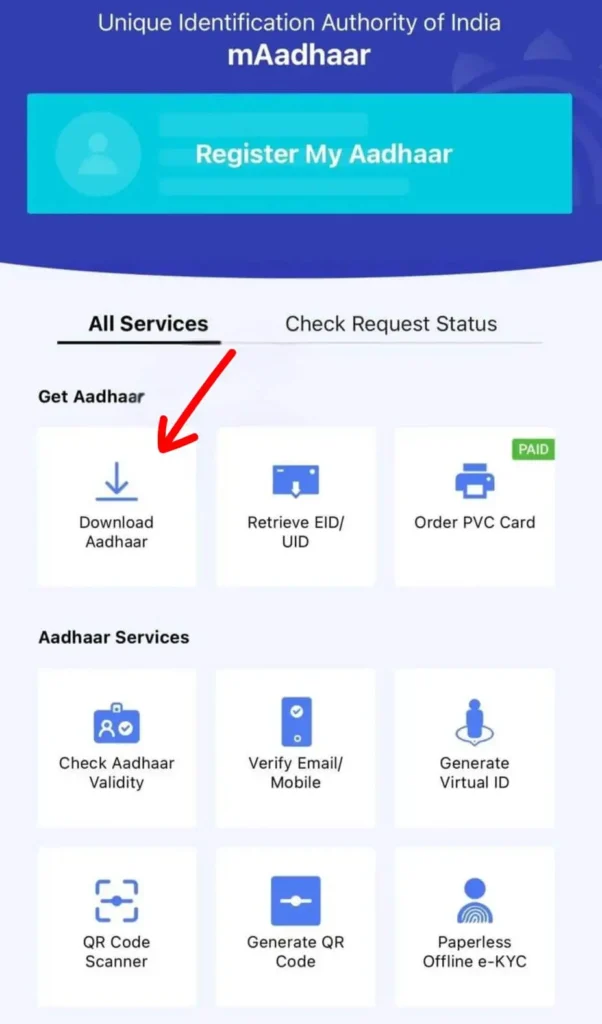
Step 3: Go to the Dashboard and Select ‘Download Aadhaar’
From the dashboard, locate and tap on the “Download Aadhaar” option.
This will take you to a new screen where you can proceed with the download process.
Step 4: Choose the Type of Aadhaar
You’ll be asked to select between two versions:
Pick the one that suits your needs.
Step 5: Enter Required Information
Next, you’ll need to provide:
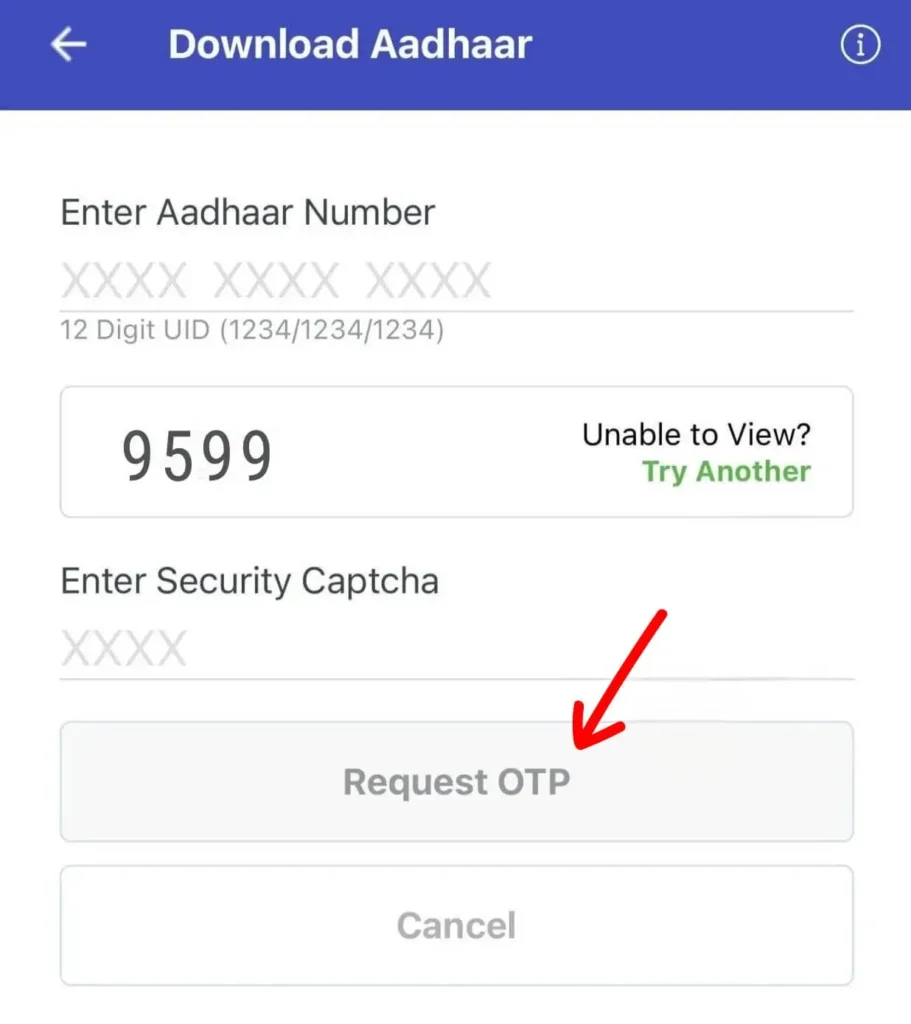
Step 6: Request and Enter OTP
Click on “Request OTP” and wait for the one-time password to arrive on your registered mobile number.
Enter the OTP in the given field to authenticate.
Step 7: Download Your Aadhaar Card
After successful verification, tap “Open” or “Download” to access your Aadhaar card in PDF format.
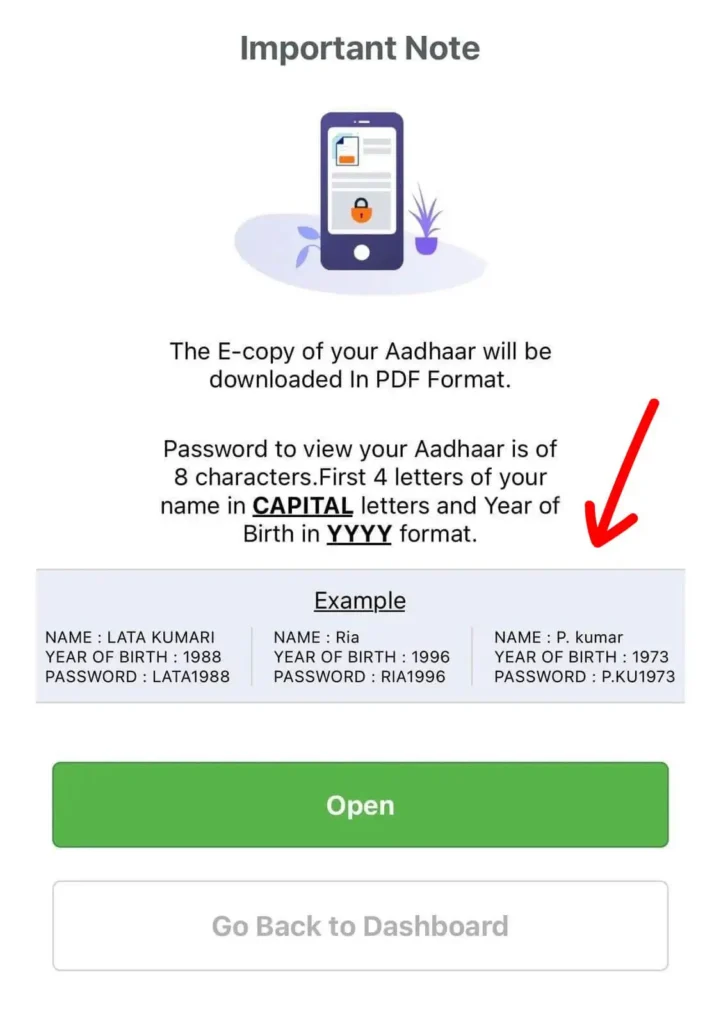
Important: The downloaded Aadhaar file is password-protected. To unlock it, enter the first 4 letters of your name in capital letters followed by your birth year (YYYY) — for example, RAJU1993.
The mAadhaar app is developed and maintained by UIDAI. It offers a secure and convenient way to store and manage your Aadhaar information digitally.
Key Features Include:
If you’re an Aadhaar holder looking for a convenient way to access your e-Aadhaar, the UMANG (Unified Mobile Application for New-age Governance) portal offers a user-friendly and secure method to download it directly.
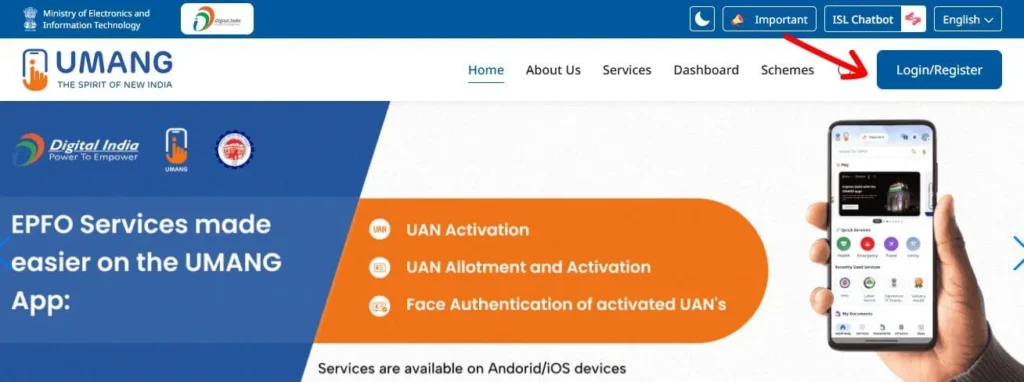
Step 1: Log In to the UMANG Portal
Open your browser and go to the official UMANG website.
Step 2: Access Aadhaar Services
Once logged in, you’ll land on the UMANG dashboard with a variety of government services.
Scroll through the list or use the search bar to locate the “Aadhaar” section. Click on it to open Aadhaar-related services.
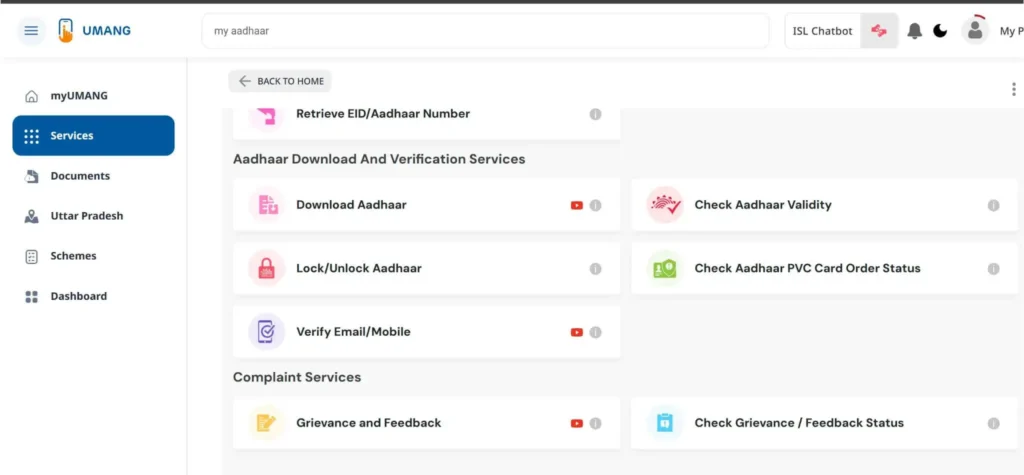
Step 3: Select the ‘Download Aadhaar’ Option
Inside the Aadhaar section, you’ll see a list of services like:
Choose “Download Aadhaar” to move to the next step.
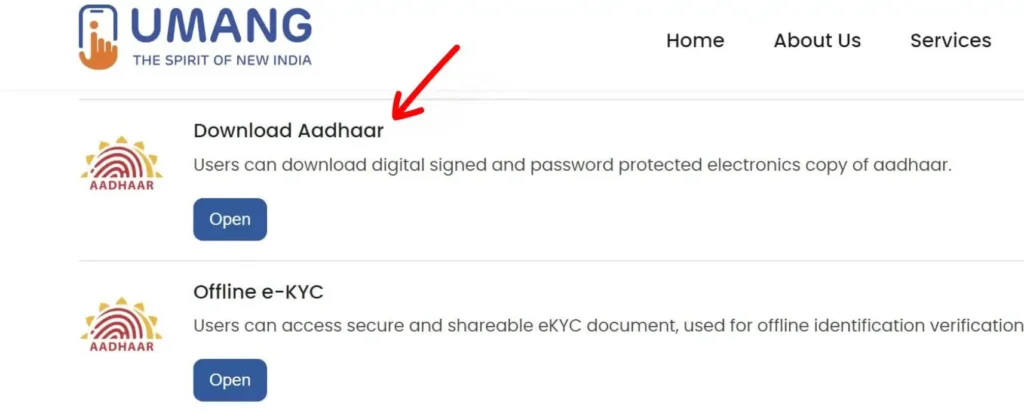
Step 4: Begin the Verification Process
Click the “Proceed” or similar button on the new screen to start your identity verification.
Step 5: Enter Your Aadhaar Number or VID
On the verification page:
Enter the OTP in the provided field to complete authentication.
Step 6: Download Your Aadhaar
After successful OTP verification, click the “Verify & Download” button.
Your e-Aadhaar will be downloaded automatically in PDF format to your device.
Important: The downloaded Aadhaar PDF is password-protected. You’ll need to use the password format:
First 4 letters of your name (in CAPS) + your birth year (YYYY)
Example: RAJU1992
Once you download your e-Aadhaar, you’ll notice that the file is password-protected. To open it, you’ll need to enter a specific combination based on your personal details.
First 4 letters of your name in UPPERCASE (as printed on your Aadhaar)
+
Your year of birth in YYYY format
| Name | Year of Birth | PDF Password |
|---|---|---|
| Neha Sharma | 1992 | NEHA1992 |
| Rakesh Singh | 1980 | RAKE1980 |
| Kavya Reddy | 1995 | KAVY1995 |
| Ankit Verma | 1988 | ANKI1988 |
| Meena Devi | 2001 | MEEN2001 |
Reminder: Your password is made by combining the first four letters of your name (as printed on Aadhaar, in UPPERCASE) and your birth year in YYYY format.
Note: If your name on Aadhaar is shorter than 4 letters, just use the full name in uppercase followed by your birth year.
Example: If your name is Ali, and you were born in 1993, your password will be ALI1993.
This password format helps protect your personal information while ensuring secure access to your Aadhaar file.
The Aadhaar card is one of India’s most important and widely accepted identity documents. Issued by the Unique Identification Authority of India (UIDAI), it features a unique 12-digit number that’s assigned to every individual resident of India.
This number serves as a proof of identity and address, and is accepted across the country by both government and private institutions. Aadhaar plays a central role in everything from opening a bank account to accessing government welfare schemes.
What makes Aadhaar particularly powerful is that it’s backed by advanced technology — it allows for biometric verification (like fingerprints or iris scans) or OTP-based authentication using your registered mobile number.
Since its launch in 2009, Aadhaar has become the foundation of India’s digital identity system, with over 1.4 billion Aadhaar numbers issued to date.
e-Aadhaar is the digital version of your Aadhaar card — a secure, password-protected PDF file that contains all the same details as your physical Aadhaar, including:
It’s issued directly by UIDAI and is digitally signed, making it just as valid as the printed Aadhaar card for most official purposes.
You can download your e-Aadhaar easily from the UIDAI portal, the mAadhaar app, DigiLocker, or UMANG. It’s especially helpful when you need quick access on the go or don’t have your physical card handy.
There’s also a Masked Aadhaar option, where the first 8 digits of your Aadhaar number are hidden for added privacy — perfect for situations where full Aadhaar details aren’t necessary.
In short, e-Aadhaar combines legal validity, convenience, and digital security into one portable document.
The Aadhaar system provides several digital services that allow residents of India to manage their identity information online. These services are designed to make everyday tasks easier, such as downloading a copy of your Aadhaar card, updating personal details, or checking the status of an application. Instead of visiting a physical enrollment center for every request, many Aadhaar-related tasks can now be completed through the official UIDAI platforms.
One of the most commonly used services is downloading e-Aadhaar, which is the electronic version of your Aadhaar card. This digital copy is available as a secure PDF file and is considered just as valid as the printed Aadhaar letter. People often download e-Aadhaar when they lose their original card, need a quick digital copy, or want to keep a backup on their phone or computer.
Another important service is checking Aadhaar status. After enrolling for Aadhaar or submitting a request to update your details, you can check the progress of your application online. By entering your Enrolment ID (EID) or Aadhaar number, you can find out whether your Aadhaar has been generated, is still under processing, or requires additional verification.
Residents can also use Aadhaar services to update personal information, such as address, mobile number, or other details linked to their Aadhaar record. In many cases, updates can be requested online, while some changes may require visiting an authorized Aadhaar enrollment or update center. Keeping your Aadhaar details accurate is important because many government and financial services rely on this information for identity verification.
Another popular service is the ability to order a PVC Aadhaar card. This is a durable, wallet-sized version of the Aadhaar card printed on plastic. It contains enhanced security features such as a secure QR code, hologram, and micro-text. Many people prefer the PVC version because it is more convenient to carry and less likely to get damaged compared to the paper Aadhaar letter.
All of these Aadhaar services are managed by the Unique Identification Authority of India (UIDAI). The official platforms allow residents to securely access their Aadhaar information, download digital copies, update details, and manage identity verification services. Using these online tools helps make Aadhaar services faster and more accessible for millions of users across the country.
The Aadhaar card is more than just an ID — it’s a gateway to a wide range of services, benefits, and verifications. Here’s how Aadhaar is used across different sectors:
There are many situations where you might need to download a copy of your Aadhaar card. Since Aadhaar is widely used as proof of identity and address in India, having a digital copy (called e-Aadhaar) can be very helpful when the physical card is not available.
One common situation is after enrolling for Aadhar for the first time. Once your Aadhaar number has been generated, you do not always have to wait for the printed card to arrive by post. You can download the e-Aadhaar online and start using it immediately. The digital version is officially accepted and contains the same information as the printed Aadhaar letter.
Another common reason is when the original Aadhaar card is lost or misplaced. Instead of going through a long replacement process, you can simply download the e-Aadhaar again from the official portal. This allows you to quickly access your identity document whenever it is required.
Many people also download Aadhaar after updating their personal details. For example, if you have recently updated your address, mobile number, or other information, the updated version of your Aadhaar can be downloaded online. This ensures that the copy you use always contains the latest information.
Downloading Aadhaar is also useful when you need a digital copy for online verification or documentation. For instance, banks, financial institutions, and government services may require a digital copy of Aadhaar during registration or verification processes. Keeping a copy of e-Aadhaar on your phone or computer makes it easier to share when needed.
Finally, some residents download Aadhaar simply to keep a backup copy for convenience. Since the e-Aadhaar file can be saved securely on your device, it helps ensure that you always have access to your Aadhaar details even if the physical card is not with you.
In short, downloading Aadhaar online is a quick and practical way to access your identity document whenever it is required.
Since Aadhaar contains important personal information, many people are concerned about how safe it is to use. The Aadhaar system has several security measures in place to protect residents’ data and prevent misuse. These protections are designed to ensure that your identity information remains secure while still allowing you to use Aadhaar for verification and government services.
One of the main security features of Aadhaar is OTP-based authentication. Whenever you download your Aadhaar card or access certain services online, a One-Time Password (OTP) is sent to your registered mobile number. This step helps confirm that the person accessing the information is the actual Aadhaar holder. Without access to the registered mobile phone, it becomes difficult for someone else to retrieve your Aadhaar details.
Another useful feature is the option to use Masked Aadhaar. A masked Aadhaar hides the first eight digits of your Aadhaar number and only shows the last four digits. This version is helpful when you need to share a copy of your Aadhaar for identification but do not want to reveal the full number. It reduces the chances of misuse while still serving as valid proof of identity.
Aadhaar documents also include a secure QR code, which allows authorities and organizations to verify the authenticity of the card. By scanning the QR code, the details stored in the Aadhaar system can be verified instantly. This helps prevent fake or altered Aadhaar documents from being used.
Residents can also choose to lock their biometrics through the Aadhaar system. This means your fingerprint and iris data cannot be used for authentication unless you unlock it again. This feature adds another layer of protection, especially for people who are concerned about biometric misuse.
It is also important for Aadhaar holders to follow simple precautions. Avoid sharing your Aadhaar number unnecessarily, and only use it with trusted institutions that require identity verification. Keeping your registered mobile number active and secure also helps protect your Aadhaar account.
Overall, the Aadhaar system includes several safeguards to protect personal information while allowing people to use Aadhaar services conveniently and safely.
Understanding how Aadhaar services work can help you avoid common problems and keep your information secure. Below are some useful guides that explain important Aadhaar topics in simple terms.
Yes, you can download your Aadhaar card online through the official UIDAI portal. The digital version is called e-Aadhaar, and it is a password-protected PDF file. This version is considered legally valid and can be used just like the printed Aadhaar card for most identification purposes.
To download your Aadhaar card online, you usually need one of the following:
You will also need access to your registered mobile number, because a one-time password (OTP) will be sent to it for verification.
Yes, e-Aadhaar is completely valid. It contains the same details as the printed Aadhaar card and is accepted as a valid proof of identity. The document also includes a secure QR code that can be used to verify its authenticity.
If the OTP is not received, first check that your mobile number is properly connected to the network. Sometimes it may take a few seconds for the message to arrive. If the issue continues, you can try requesting the OTP again. In some cases, the mobile number registered with Aadhaar may need to be updated before the service can be used.
Downloading Aadhaar online normally requires OTP verification sent to the registered mobile number. If your mobile number is not linked to your Aadhaar, you may need to update your mobile number at an authorized Aadhaar enrollment or update center before using online download services.
The e-Aadhaar PDF file is protected with a password. The password is usually a combination of the first four letters of your name (in capital letters) and your birth year. This security feature helps protect your personal information.
There is no strict limit on how many times you can download your Aadhaar card. As long as you have the required details and can complete OTP verification, you can download the e-Aadhaar whenever needed.
If you notice incorrect information on your Aadhaar card, such as an address or name spelling mistake, you can submit a request to update your details through the official Aadhaar update process. Once the changes are approved, you can download the updated e-Aadhaar online.
If you’re facing issues or have questions about your Aadhaar card, you can reach out using the following official channels: