Aadhar Card Download
Your Trusted Guide to Aadhaar Services
Your Trusted Guide to Aadhaar Services
Logging in to the UIDAI MyAadhaar portal is the first step to accessing a wide range of Aadhaar services online—from checking updates to downloading your Aadhaar card. This page explains how to log in securely, what you’ll need, and where to go for common UIDAI-related tasks.
The Unique Identification Authority of India (UIDAI) has transformed how Indian residents manage their digital identity through the MyAadhaar portal at myaadhaar.uidai.gov.in. This secure and user-friendly platform enables Aadhaar holders to access a wide range of essential services—anytime, anywhere.
With just your 12-digit Aadhaar number and OTP verification, you can log in to the portal and take full control of your Aadhaar profile. Whether you’re updating personal information, downloading documents, or generating a Virtual ID, everything is accessible in one centralized location.
UIDAI login usually refers to signing in to the MyAadhaar portal, the official online platform where Aadhaar holders can access different Aadhaar-related services. Instead of visiting a center for every small task, users can use this portal to manage important services online in a simpler way.
When people search for UIDAI login, they are usually looking for the page where they can access services such as downloading e-Aadhaar, checking update status, ordering a PVC Aadhaar card, updating certain details, or managing Aadhaar-related settings. In most cases, this login process is connected to the MyAadhaar portal, which is designed to help users safely access these services from home.
The UIDAI login system is meant to confirm that the person trying to access Aadhaar services is the rightful Aadhaar holder. That is why login-related actions often involve OTP verification through the registered mobile number. This added step helps protect personal information and prevents unauthorized access.
In simple words, UIDAI login is not a separate Aadhaar number registration process. It is the access point for using Aadhaar services online. If your mobile number is linked with Aadhaar, logging in becomes easier and more useful because many services depend on OTP verification.
Logging in to MyAadhaar is usually a straightforward process, but it helps to know the basic steps before you begin. Most users go to the portal because they want to use one specific service, such as downloading Aadhaar, checking an update request, or ordering a PVC card.
Follow these steps to access the MyAadhaar portal and use Aadhaar services online.
In many cases, users do not see a traditional dashboard-style login like banking websites. Instead, the MyAadhaar portal works more like a service-based access system, where you choose the task first and then verify yourself before proceeding. That is why some people feel confused when searching for “UIDAI login,” expecting a normal username-and-password page.
The important thing to remember is that access is usually tied to your Aadhaar details and registered mobile number, not a separate account password in the usual sense.
The UIDAI login portal isn’t just a website—it’s a secure digital hub designed to help you manage every aspect of your Aadhaar details. After logging in, you can:
This UIDAI login portal ensures that your digital identity is always within your control.
Before trying to access MyAadhaar services, it helps to know what you usually need. This can save time and avoid login problems later.
The most important requirement is access to your registered mobile number. Many UIDAI services send a one-time password to that number for verification. If your old mobile number is no longer active, you may not be able to complete certain login-based services until the number is updated in your Aadhaar record.
You may also need one of the following, depending on the service:
Some services may also ask you to complete a captcha or security code before the OTP is sent. This is a normal security step and helps prevent misuse of the portal.
It is also important to use the correct and official Aadhaar-linked information. If there is a mismatch in details or if the mobile number is not properly linked, login-related services may not work as expected.
In simple terms, the basic things most people need are:
If all of these are in place, using the UIDAI login process is usually much smoother.
To access a wide range of online Aadhaar services—such as updating documents, downloading your Aadhaar card, retrieving your Aadhaar or EID number, verifying your mobile or email, generating a VID, locking/unlocking Aadhaar, checking bank seeding status, and more—you’ll need to log in to the official UIDAI MyAadhaar portal.
Follow the steps below to log in securely:
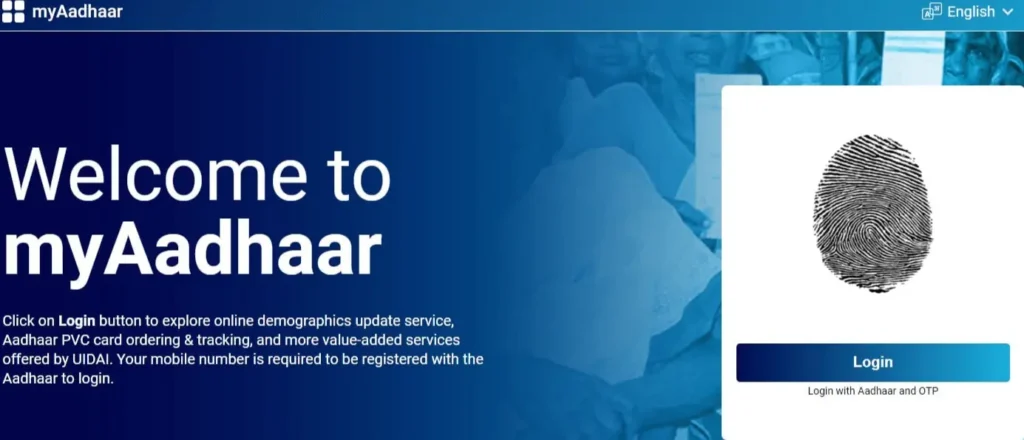
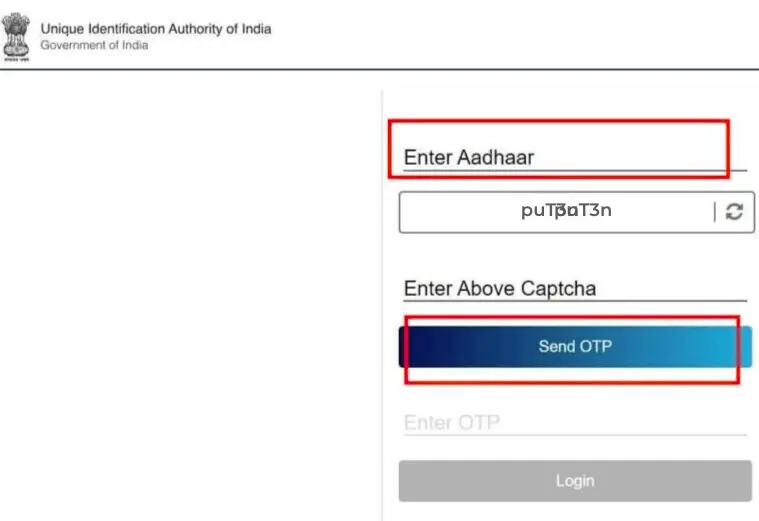
Once logged in, you’ll be able to manage your Aadhaar profile, download your card, check linking status with your bank, order a PVC Aadhaar card, and more.
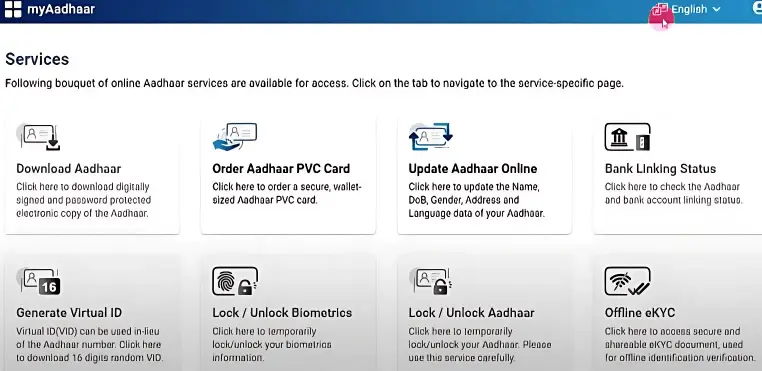
Keeping your Aadhaar details accurate and up to date ensures uninterrupted access to government services and benefits.
Once you successfully access the MyAadhaar portal, you can use a number of important Aadhaar services online. This is the main reason why so many users search for UIDAI login in the first place.
One of the most common services is downloading e-Aadhaar, which allows you to get a digital copy of your Aadhaar card. This is especially useful if the physical card is lost, misplaced, or not immediately available.
Users may also be able to check Aadhaar update status after submitting a correction or update request. This helps track whether the request is still under review, approved, or rejected.
Another useful option is ordering a PVC Aadhaar card, which is the wallet-sized plastic version of Aadhaar. Many people prefer it because it is more durable and easier to carry.
Depending on the available service options, users may also be able to:
For most users, the biggest benefit of logging in is convenience. Instead of depending only on offline visits, many common Aadhaar tasks can be started or managed online in a safer and faster way.
To access the full range of features, you’ll need to log in to myaadhaar.uidai.gov.in. Once logged in, you can:
Some services are also available without logging in:
Important: While many services can be used without logging in, accessing your full Aadhaar dashboard via UIDAI login unlocks the complete range of features and control. Keeping your details updated and secure ensures smooth access to Aadhaar-linked government services and benefits.
The Unique Identification Authority of India (UIDAI) offers a robust digital platform known as the MyAadhaar Dashboard, accessible at myaadhaar.uidai.gov.in. This user-friendly portal centralizes key Aadhaar services in one place, making it easier for Indian residents to manage their Aadhaar details online—without needing to visit a physical center.
From downloading your Aadhaar to checking its linkage with your bank account, the MyAadhaar dashboard simplifies every step of identity management.
Core Aadhaar Services (Login Required)
These services require you to log in using your Aadhaar number and OTP:
1. Download Aadhaar (e-Aadhaar)
Download a digitally signed, password-protected PDF version of your Aadhaar card. This electronic Aadhaar is valid for all official and legal purposes.
→ Download Aadhaar
2. Retrieve Aadhaar Number / Enrollment ID (EID)
Lost your Aadhaar number or misplaced your enrollment slip? Easily retrieve either your Aadhaar (UID) or Enrollment ID using your registered mobile number or email.
→ Retrieve UID/EID
3. Verify Email ID / Mobile Number
Ensure your email and mobile number are correctly linked to your Aadhaar to receive OTPs and alerts.
→ Verify Email/Mobile
4. Document Update (PoI/PoA)
Upload scanned copies of Proof of Identity (PoI) and Proof of Address (PoA) to update your Aadhaar details online.
Note: Free update service is available until 14 June 2025.
→ Update Aadhaar Documents
5. Lock / Unlock Aadhaar
Temporarily lock your Aadhaar number to prevent unauthorized usage. You can unlock it whenever needed for authentication.
→ Lock/Unlock Aadhaar
6. VID Generator
Generate a secure, revocable Virtual ID (VID)—a 16-digit number that you can use in place of your Aadhaar for certain services.
→ Generate VID
7. Check Bank Seeding Status
Find out whether your Aadhaar is successfully linked (seeded) to your bank account for direct benefit transfers and subsidy services.
→ Check Bank Linking
Services Available Without a Registered Mobile Number
These services do not require OTP or a linked mobile number, making them accessible to users with unregistered or changed numbers:
8. Order Aadhaar PVC Card
Request a durable, wallet-sized PVC Aadhaar card. It includes security features like holograms, QR code, and micro text.
→ Order PVC Aadhaar
9. Check PVC Card Delivery Status
Track the printing and dispatch status of your ordered PVC Aadhaar card using SRN or Aadhaar number.
→ Check PVC Status
10. Check Enrolment / Update Status
Use your EID (Enrollment ID) to check the progress of your Aadhaar enrolment or update request.
→ Track Aadhaar Status
11. Locate Enrolment Center
Find the nearest Aadhaar Seva Kendra for enrolment, biometric updates, or demographic changes.
→ Find Center
12. Book an Appointment
Schedule a visit to your nearest Aadhaar center online for new Aadhaar enrolment or to update existing details.
→ Book Appointment
13. Validate Aadhaar
Confirm whether a given Aadhaar number is valid and active using UIDAI’s Aadhaar verification tool.
→ Validate Aadhaar
Grievance Redressal and Feedback
14. Submit a Grievance or Feedback
Have a complaint or suggestion? Submit it directly through the UIDAI login portal.
→ Submit Grievance/Feedback
15. Track Grievance / Feedback Status
Monitor the status and resolution progress of your submitted issue or feedback.
→ Track Complaint
Even though the MyAadhaar portal is designed to be simple, users may occasionally face login issues. Most problems are related to OTP verification, incorrect details, or temporary system delays. Understanding the common causes can help you resolve the issue quickly.
One of the most common issues during UIDAI login is not receiving the OTP. Since the login process relies on OTP verification, access cannot be completed until the code is entered.
If the OTP does not arrive, first check that your mobile network signal is stable. Sometimes messages may be delayed due to network congestion. Waiting for a short time and requesting the OTP again often solves the problem.
Another possible reason is that the mobile number linked with Aadhaar is inactive or incorrect. In that case, OTP messages will not reach your phone.
Sometimes login attempts fail simply because the Aadhaar number or other information was entered incorrectly. Even a small typing mistake can prevent the system from verifying the request.
Before trying again, double-check that the Aadhaar number, Virtual ID, or other required information is entered correctly.
The portal usually asks users to complete a captcha security check before sending the OTP. If the captcha code is entered incorrectly, the system will not continue with the login process.
Refreshing the captcha and entering the new code carefully usually resolves this issue.
Since millions of users access Aadhaar services, the portal may occasionally experience high traffic. During such periods, some login requests may take longer than usual.
If the portal appears slow or unresponsive, waiting a few minutes and trying again later usually fixes the problem.
Some users try to access Aadhaar services without having their mobile number linked to Aadhaar. Because many services require OTP verification, login may not work properly in such cases.
Ensuring that your mobile number is correctly linked with Aadhaar helps prevent this problem.
What is the UIDAI Aadhaar Login portal?
The UIDAI Aadhaar Login portal is a secure online gateway provided by the Unique Identification Authority of India (UIDAI). It enables residents to access and manage a range of Aadhaar-related services, such as downloading Aadhaar, updating personal details, verifying linked mobile/email, and more—from a single dashboard.
To log in:
Once logged in, you can:
Yes. After logging into the MyAadhaar portal, you can download a digitally signed, password-protected PDF version of your Aadhaar card. This e-Aadhaar is valid for all government and legal identification purposes.
Through the UIDAI login portal, you can update:
A Virtual ID (VID) is a 16-digit temporary number generated by UIDAI that you can use in place of your Aadhaar number. It helps protect your privacy during authentication without revealing your actual Aadhaar number.
You can enhance security by using the lock/unlock feature on the MyAadhaar portal. It lets you temporarily disable your Aadhaar number or biometric authentication to prevent unauthorized access.
No. The Aadhaar login system usually works through OTP verification sent to the mobile number registered with Aadhaar. This helps confirm the identity of the Aadhaar holder.
Most online Aadhaar services require OTP verification, which is sent to the registered mobile number. If the number is not linked with Aadhaar, certain services may not work until the mobile number is updated.
Yes. When people search for UIDAI login, they are usually referring to the MyAadhaar portal, where users can access Aadhaar-related services online.
Absolutely. The UIDAI login portal uses industry-standard encryption and secure OTP-based login to ensure your Aadhaar data remains private and protected during every session.
Whether you’re downloading your Aadhaar card, verifying contact details, or updating personal information, the MyAadhaar Dashboard puts everything at your fingertips. Logging in unlocks the full suite of services, but many useful tools are available even without an OTP.
For official services, always use the UIDAI-approved login portal at https://myaadhaar.uidai.gov.in.