আধার কার্ড ডাউনলোড
আধার পরিষেবার জন্য আপনার বিশ্বস্ত নির্দেশিকা
আধার পরিষেবার জন্য আপনার বিশ্বস্ত নির্দেশিকা
The Aadhaar card is one of the most essential identification documents in India, which is only issued by the Government of India through the Unique Identification Authority of India (UIDAI).
প্রতিটি কার্ডে একটি অনন্য ১২-সংখ্যার নম্বর থাকে যা একটি বৈধ প্রমাণ হিসেবে কাজ করে ভারতীয় বাসিন্দাদের জন্য পরিচয় এবং ঠিকানা উভয়েরই।
Residents can download their Aadhaar card online through the official UIDAI portal. The digital copy, known as e-Aadhaar, is available as a password-protected PDF and is legally valid for identification. Users can download Aadhaar using their Aadhaar number, Enrolment ID (EID), or through services such as DigiLocker.
There are several ways to download Aadhaar card online. The most common methods include:
ভারতীয় নাগরিকরা সহজেই তাদের ই-আধার ডাউনলোড করুন চারটি অফিসিয়াল এবং সুবিধাজনক পদ্ধতির মাধ্যমে। এই প্রতিটি পদ্ধতির জন্য এখানে একটি দ্রুত ধাপে ধাপে নির্দেশিকা দেওয়া হল।
বিঃদ্রঃ: এর অধীনে আধার আইন, আপনার ই-আধার ফিজিক্যাল কার্ডের মতোই আইনত বৈধ — এটি সমস্ত সরকারি এবং বেসরকারি পরিষেবায় ব্যবহার করা যেতে পারে।
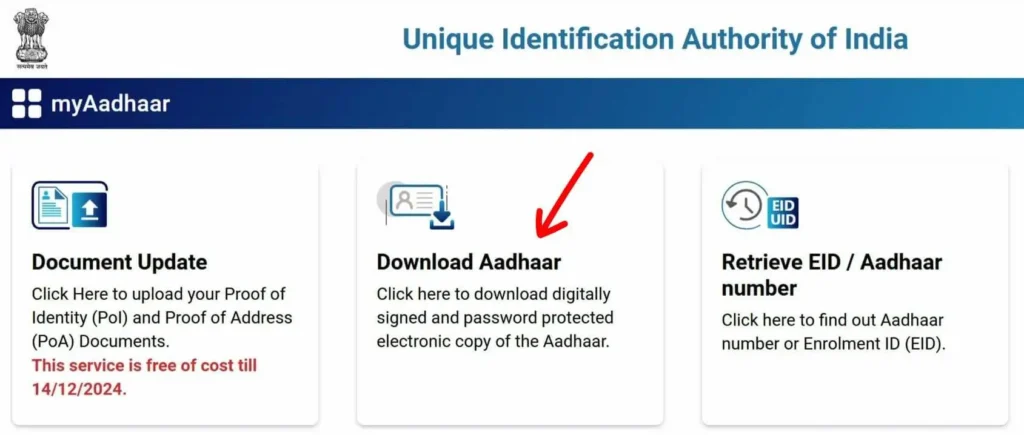
এখন তুমি জানো: The EID, or Enrolment ID, is a 28-digit number you get when you first login at UIDAI and apply for Aadhaar — it helps you track your application status. Once your Aadhaar is approved, you’re assigned a 12-digit UID, also known as your Aadhaar number, which acts as your official proof of identity and address.
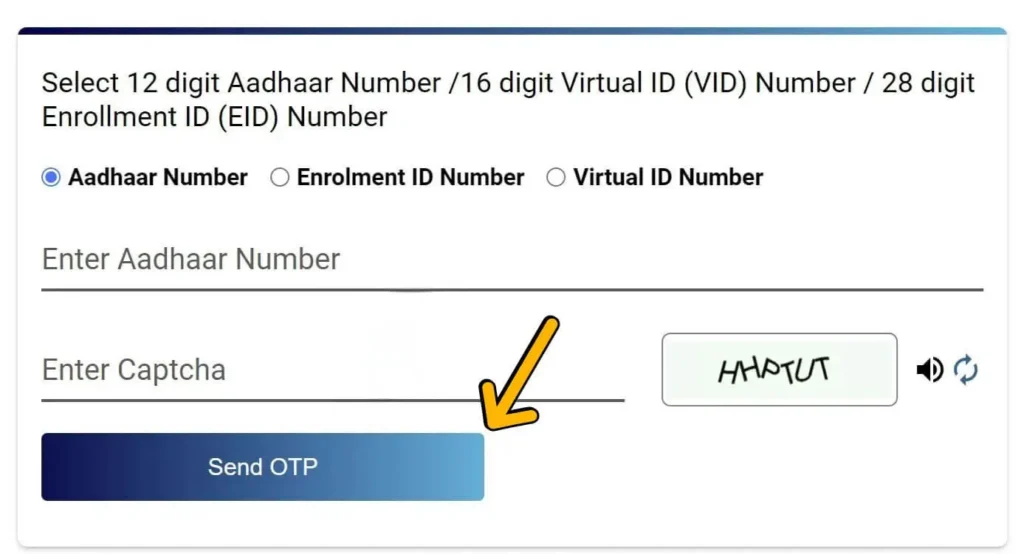
বিঃদ্রঃ: যদি আপনার মোবাইল নম্বরটি আপনার আধারের সাথে লিঙ্ক করা না থাকে, তাহলে এটি যোগ বা আপডেট করার জন্য আপনাকে আপনার নিকটতম আধার তালিকাভুক্তি বা পরিষেবা কেন্দ্রে যেতে হবে।
টিপ: "ব্যবহার করুন"আধার/ঈদ কার্ড উদ্ধার করুন"আপনার বিবরণ ভুলে গেলে" টুলটি ব্যবহার করুন।
আপনার আধার ডাউনলোড করা হচ্ছে ডিজিলকার এটি আপনার আইডি যেকোনো সময়, যেকোনো জায়গায় অ্যাক্সেস করার একটি নিরাপদ এবং কাগজবিহীন উপায়। এটি ফিজিক্যাল কপি বহন করার প্রয়োজন দূর করে এবং আপনার নখদর্পণে দ্রুত প্রমাণীকরণ নিশ্চিত করে।
ধাপ ১: ডিজিলকারে লগ ইন করুন
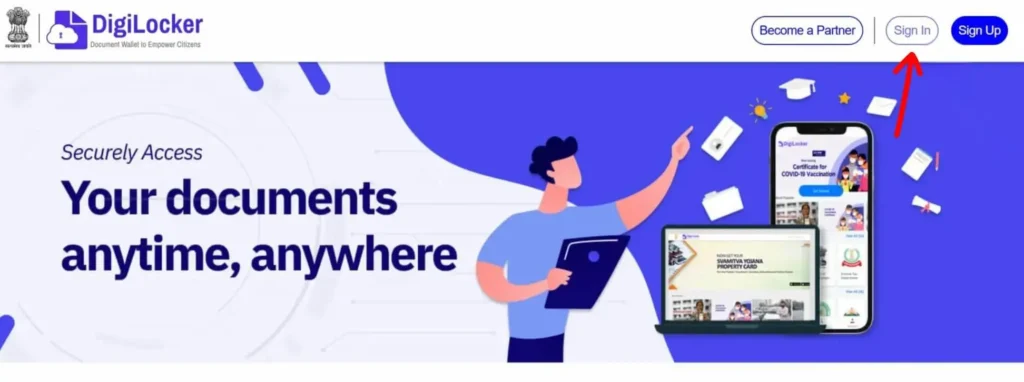
বিঃদ্রঃ: যদি আপনি এখনও সাইন আপ না করে থাকেন, তাহলে আপনার মোবাইল নম্বর এবং ইমেল ব্যবহার করে একটি DigiLocker অ্যাকাউন্ট তৈরি করতে পারেন। প্রক্রিয়াটি সহজ এবং মাত্র কয়েক মিনিট সময় নেয়।
ধাপ ২: আধার পরিষেবা অনুসন্ধান করুন
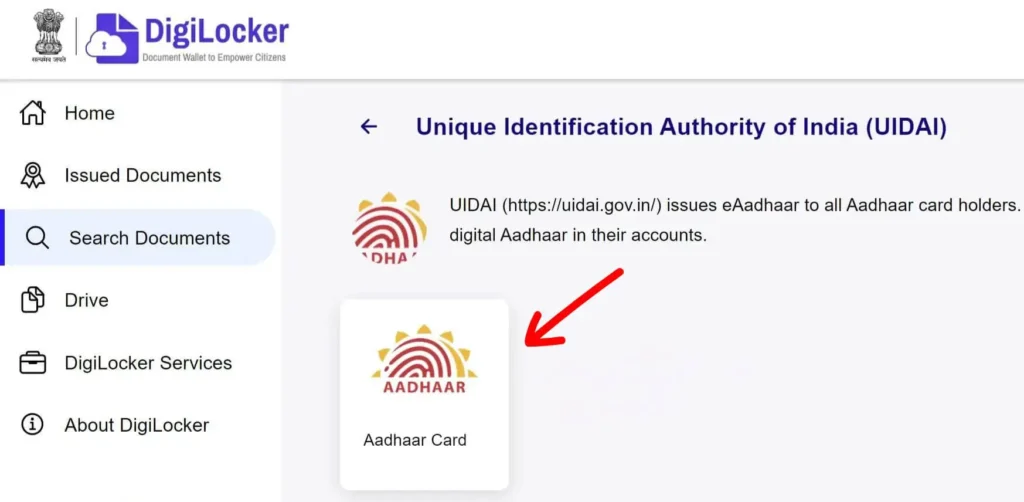
ধাপ ৩: আপনার আধারের বিবরণ লিখুন।
ধাপ ৪: আপনার আধার পুনরুদ্ধার করুন
ধাপ ৫: আপনার আধার কার্ড ডাউনলোড করুন
দ্য mAadhaar অ্যাপUIDAI দ্বারা তৈরি, আপনার স্মার্টফোন থেকে যেকোনো সময় আপনার আধার অ্যাক্সেস করার একটি নিরাপদ এবং সুবিধাজনক উপায় প্রদান করে। এই পদক্ষেপগুলি অনুসরণ করুন আধার ডাউনলোড করুন অ্যাপটি ব্যবহার করে:
ধাপ 1: mAadhaar অ্যাপ ইনস্টল করুন
অফিসিয়াল ডাউনলোড করে শুরু করুন mAadhaar অ্যাপ আপনার অ্যাপ স্টোর থেকে।
ধাপ ২: অ্যাপটি খুলুন এবং নিবন্ধন করুন
অ্যাপটি চালু করুন এবং নিবন্ধন প্রক্রিয়া শুরু করুন।
একবার যাচাই হয়ে গেলে, আপনি মূল ড্যাশবোর্ডে পৌঁছে যাবেন।
ধাপ ৩: ড্যাশবোর্ডে যান এবং 'আধার ডাউনলোড করুন' নির্বাচন করুন।
ড্যাশবোর্ড থেকে, সনাক্ত করুন এবং ট্যাপ করুন "আধার ডাউনলোড করুন" বিকল্প।
এটি আপনাকে একটি নতুন স্ক্রিনে নিয়ে যাবে যেখানে আপনি ডাউনলোড প্রক্রিয়াটি এগিয়ে যেতে পারবেন।
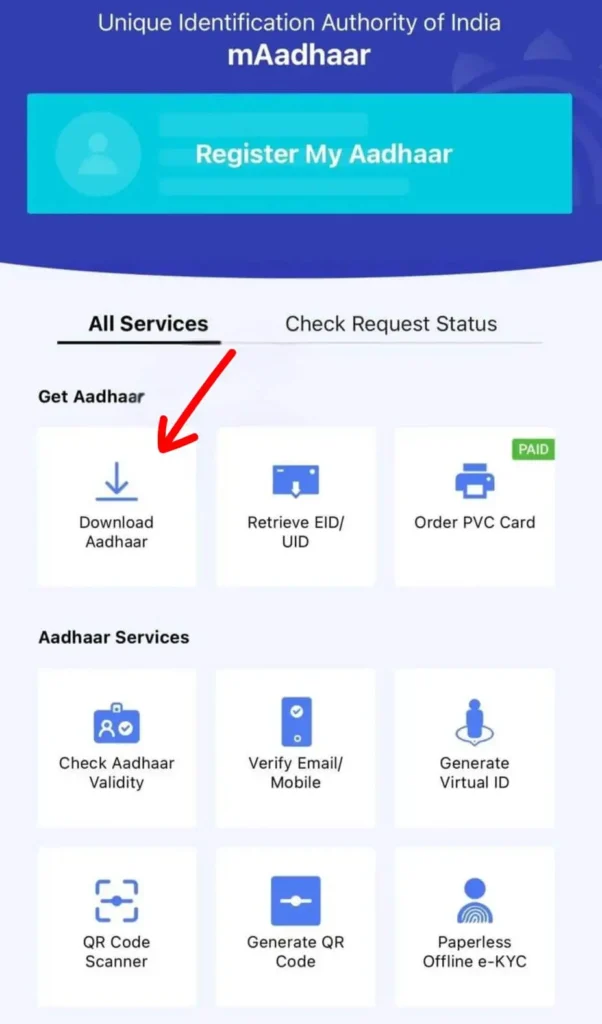
ধাপ ৪: আধারের ধরণ নির্বাচন করুন
আপনাকে দুটি সংস্করণের মধ্যে একটি নির্বাচন করতে বলা হবে:
আপনার প্রয়োজন অনুসারে একটি বেছে নিন।
ধাপ ৫: প্রয়োজনীয় তথ্য লিখুন
এরপর, আপনাকে প্রদান করতে হবে:
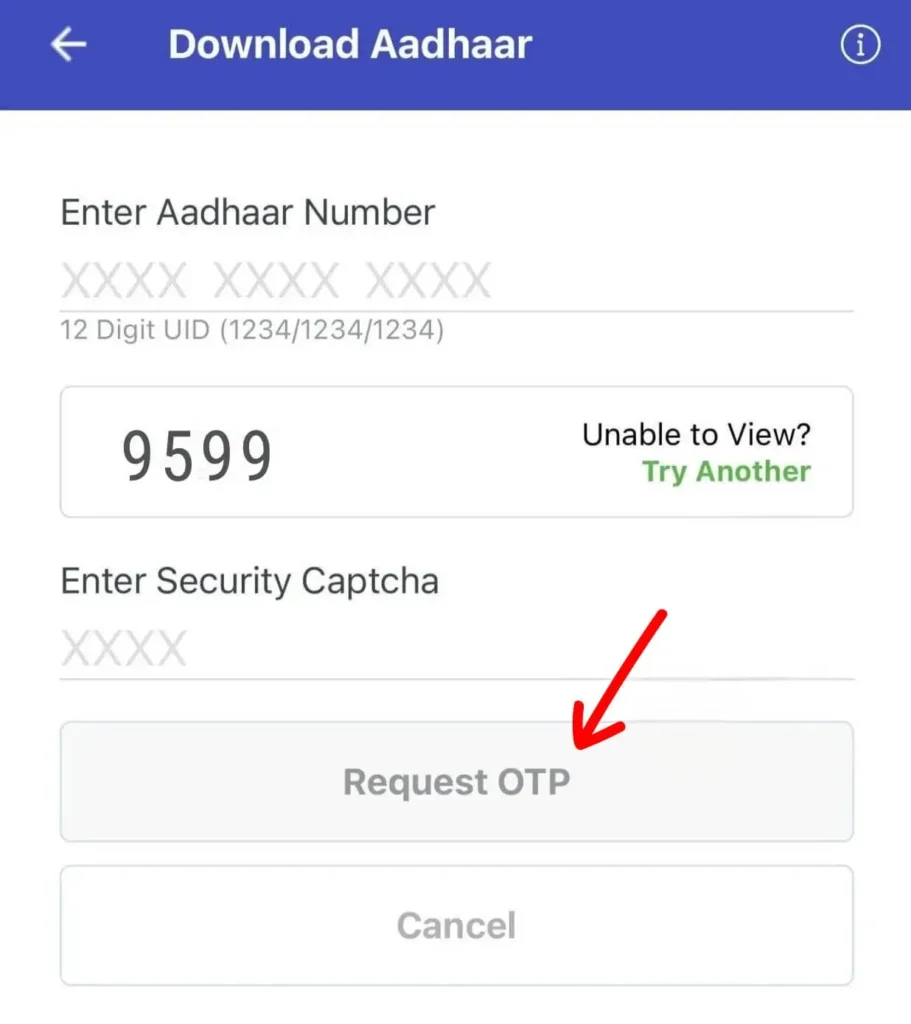
ধাপ ৬: অনুরোধ করুন এবং OTP লিখুন
ক্লিক করুন “OTP অনুরোধ করুন” এবং আপনার নিবন্ধিত মোবাইল নম্বরে ওয়ান-টাইম পাসওয়ার্ড আসার জন্য অপেক্ষা করুন।
প্রমাণীকরণের জন্য প্রদত্ত ক্ষেত্রে OTP লিখুন।
ধাপ ৭: আপনার আধার কার্ড ডাউনলোড করুন
সফল যাচাইকরণের পরে, ট্যাপ করুন "খোলা" অথবা "ডাউনলোড করুন" আপনার আধার কার্ড অ্যাক্সেস করতে পিডিএফ ফরম্যাট.
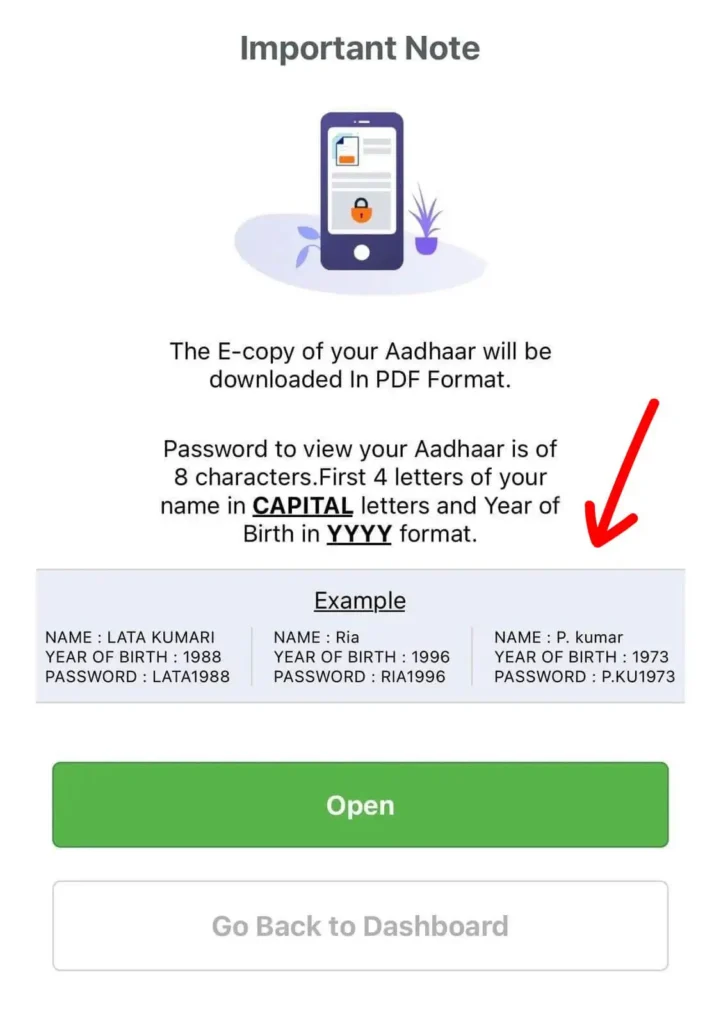
গুরুত্বপূর্ণ: ডাউনলোড করা আধার ফাইলটি পাসওয়ার্ড-সুরক্ষিত। এটি আনলক করতে, প্রবেশ করুন তোমার নামের প্রথম ৪টি অক্ষর বড় হাতের অক্ষরে এরপর তোমার জন্ম সাল (YYYY) — উদাহরণস্বরূপ, রাজু১৯৯৩.
দ্য এমআধার অ্যাপটি UIDAI দ্বারা তৈরি এবং রক্ষণাবেক্ষণ করা হয়। এটি আপনার আধার তথ্য ডিজিটালভাবে সংরক্ষণ এবং পরিচালনা করার জন্য একটি নিরাপদ এবং সুবিধাজনক উপায় প্রদান করে।
মূল বৈশিষ্ট্যগুলির মধ্যে রয়েছে:
আপনি যদি একজন আধারধারী হন এবং আপনার ই-আধার অ্যাক্সেস করার জন্য একটি সুবিধাজনক উপায় খুঁজছেন, তাহলে উমং (নতুন যুগের শাসনের জন্য ইউনিফাইড মোবাইল অ্যাপ্লিকেশন) পোর্টালটি সরাসরি ডাউনলোড করার জন্য একটি ব্যবহারকারী-বান্ধব এবং নিরাপদ পদ্ধতি প্রদান করে।
ধাপ ১: উমং পোর্টালে লগ ইন করুন।
আপনার ব্রাউজারটি খুলুন এবং অফিসিয়াল ওয়েবসাইটে যান। উমং ওয়েবসাইট.
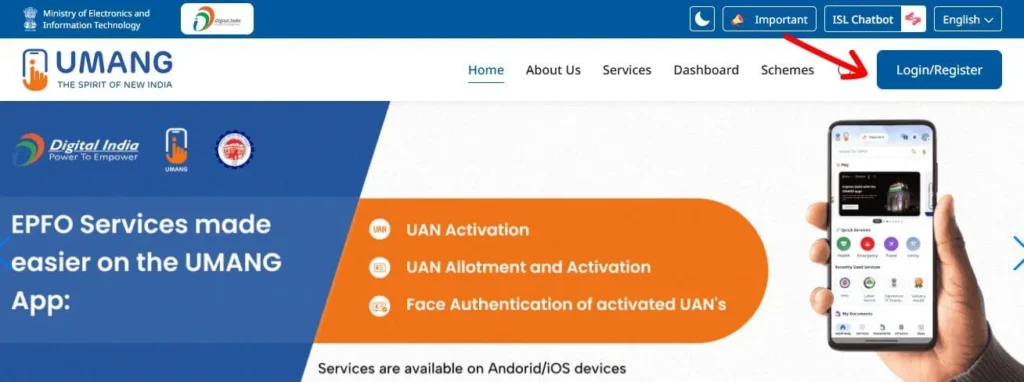
ধাপ ২: আধার পরিষেবা অ্যাক্সেস করুন
লগ ইন করার পর, আপনি বিভিন্ন ধরণের সরকারি পরিষেবা সহ UMANG ড্যাশবোর্ডে পৌঁছে যাবেন।
তালিকাটি স্ক্রোল করুন অথবা অনুসন্ধান বার ব্যবহার করে খুঁজে বের করুন "আধার" বিভাগ। আধার-সম্পর্কিত পরিষেবা খুলতে এটিতে ক্লিক করুন।
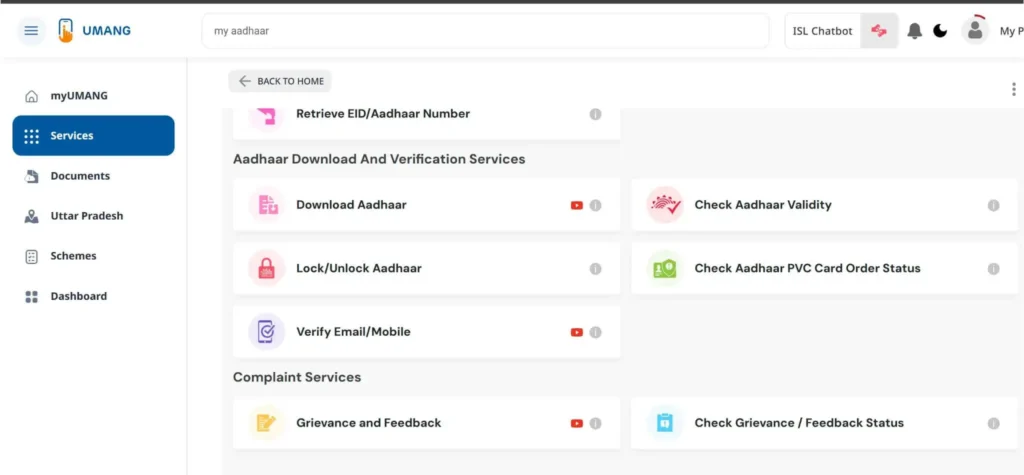
ধাপ ৩: 'ডাউনলোড আধার' বিকল্পটি নির্বাচন করুন।
আধার বিভাগের ভিতরে, আপনি পরিষেবাগুলির একটি তালিকা দেখতে পাবেন যেমন:
পছন্দ করা "আধার ডাউনলোড করুন" পরবর্তী ধাপে যেতে।
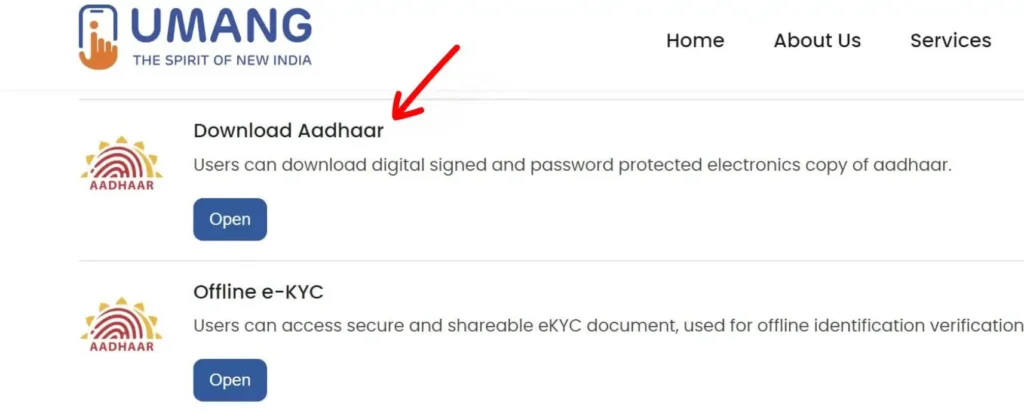
ধাপ ৪: যাচাইকরণ প্রক্রিয়া শুরু করুন
ক্লিক করুন "এগিয়ে যান" অথবা নতুন স্ক্রিনে অনুরূপ বোতামটি টিপুন যাতে আপনার পরিচয় যাচাই শুরু হয়।
ধাপ ৫: আপনার আধার নম্বর বা ভিআইডি লিখুন।
যাচাইকরণ পৃষ্ঠায়:
প্রমাণীকরণ সম্পূর্ণ করতে প্রদত্ত ক্ষেত্রে OTP লিখুন।
ধাপ ৬: আপনার আধার ডাউনলোড করুন
সফলভাবে OTP যাচাইকরণের পরে, ক্লিক করুন "যাচাই করুন এবং ডাউনলোড করুন" বোতাম।
তোমার ই-আধার স্বয়ংক্রিয়ভাবে ডাউনলোড হবে ভিতরে পিডিএফ ফরম্যাট আপনার ডিভাইসে।
গুরুত্বপূর্ণ: ডাউনলোড করা আধার পিডিএফটি পাসওয়ার্ড-সুরক্ষিত। আপনাকে পাসওয়ার্ড ফর্ম্যাটটি ব্যবহার করতে হবে:
আপনার নামের প্রথম ৪টি অক্ষর (CAPS তে) + আপনার জন্ম সাল (YYYY)
উদাহরণ: RAJU1992
আপনার ই-আধার ডাউনলোড করার পর, আপনি লক্ষ্য করবেন যে ফাইলটি পাসওয়ার্ড-সুরক্ষিত। এটি খুলতে, আপনাকে আপনার ব্যক্তিগত তথ্যের উপর ভিত্তি করে একটি নির্দিষ্ট সংমিশ্রণ প্রবেশ করতে হবে।
তোমার নামের প্রথম ৪টি অক্ষর বড় হাতের অক্ষরে লিখো (আপনার আধারে মুদ্রিত)
+
YYYY ফর্ম্যাটে আপনার জন্ম সাল
| নাম | জন্ম সাল | পিডিএফ পাসওয়ার্ড |
|---|---|---|
| Neha Sharma | 1992 | NEHA1992 |
| Rakesh Singh | 1980 | RAKE1980 |
| Kavya Reddy | 1995 | KAVY1995 |
| Ankit Verma | 1988 | ANKI1988 |
| Meena Devi | 2001 | MEEN2001 |
অনুস্মারক: আপনার পাসওয়ার্ডটি একত্রিত করে তৈরি করা হয়েছে প্রথম চারটি অক্ষর আপনার নাম (যেমন আধারে বড় হাতের অক্ষরে মুদ্রিত) এবং আপনার YYYY ফর্ম্যাটে জন্ম সাল.
বিঃদ্রঃ: যদি আধারে আপনার নাম ৪ অক্ষরের কম হয়, তাহলে পুরো নাম বড় হাতের অক্ষরে লিখুন এবং তারপর আপনার জন্ম সাল লিখুন।
উদাহরণ: যদি আপনার নাম আলী, এবং আপনার জন্ম ১৯৯৩ সালে, আপনার পাসওয়ার্ড হবে ALI1993.
এই পাসওয়ার্ড ফর্ম্যাটটি আপনার ব্যক্তিগত তথ্য সুরক্ষিত রাখতে সাহায্য করে এবং আপনার আধার ফাইলে নিরাপদ অ্যাক্সেস নিশ্চিত করে।
দ্য আধার কার্ড ভারতের সবচেয়ে গুরুত্বপূর্ণ এবং বহুল স্বীকৃত পরিচয়পত্রগুলির মধ্যে একটি। দ্বারা জারি করা হয়েছে ভারতের অনন্য পরিচয় কর্তৃপক্ষ (UIDAI), এটি একটি অনন্য বৈশিষ্ট্যযুক্ত ১২-সংখ্যার সংখ্যা যা ভারতের প্রতিটি বাসিন্দার জন্য নির্ধারিত।
এই সংখ্যাটি একটি হিসেবে কাজ করে পরিচয় এবং ঠিকানার প্রমাণপত্র, এবং সারা দেশে সরকারি এবং বেসরকারি উভয় প্রতিষ্ঠানেই এটি গৃহীত। ব্যাংক অ্যাকাউন্ট খোলা থেকে শুরু করে সরকারি কল্যাণমূলক প্রকল্পগুলিতে অ্যাক্সেস পাওয়া পর্যন্ত সবকিছুতেই আধার কেন্দ্রীয় ভূমিকা পালন করে।
আধারকে বিশেষভাবে শক্তিশালী করে তোলে কারণ এটি উন্নত প্রযুক্তি দ্বারা সমর্থিত - এটি অনুমতি দেয় বায়োমেট্রিক যাচাইকরণ (যেমন আঙুলের ছাপ বা আইরিস স্ক্যান) অথবা OTP-ভিত্তিক প্রমাণীকরণ আপনার নিবন্ধিত মোবাইল নম্বর ব্যবহার করে।
২০০৯ সালে চালু হওয়ার পর থেকে, আধার ভারতের ডিজিটাল পরিচয় ব্যবস্থার ভিত্তি হয়ে উঠেছে, এখন পর্যন্ত ১.৪ বিলিয়নেরও বেশি আধার নম্বর জারি করা হয়েছে।
ই-আধার হল আপনার আধার কার্ডের ডিজিটাল সংস্করণ — একটি নিরাপদ, পাসওয়ার্ড-সুরক্ষিত PDF ফাইল যাতে আপনার আধারের মতো একই তথ্য থাকবে, যার মধ্যে রয়েছে:
এটি সরাসরি জারি করা হয় UIDAI এবং হল ডিজিটালি স্বাক্ষরিত, যা বেশিরভাগ অফিসিয়াল উদ্দেশ্যে মুদ্রিত আধার কার্ডের মতোই বৈধ করে তোলে।
আপনি UIDAI পোর্টাল, mAadhaar অ্যাপ, DigiLocker, অথবা UMANG থেকে সহজেই আপনার ই-আধার ডাউনলোড করতে পারেন। এটি বিশেষভাবে সহায়ক যখন আপনার চলার পথে দ্রুত অ্যাক্সেসের প্রয়োজন হয় অথবা আপনার কাছে আপনার ফিজিক্যাল কার্ড না থাকে।
এছাড়াও একটি আছে মুখোশধারী আধার বিকল্প, যেখানে অতিরিক্ত গোপনীয়তার জন্য আপনার আধার নম্বরের প্রথম 8টি সংখ্যা লুকানো থাকে — এমন পরিস্থিতিতে যেখানে সম্পূর্ণ আধার বিবরণের প্রয়োজন হয় না তার জন্য উপযুক্ত।
সংক্ষেপে, ই-আধার একত্রিত করে আইনি বৈধতা, সুবিধা এবং ডিজিটাল নিরাপত্তা একটি পোর্টেবল ডকুমেন্টে।
The Aadhaar system provides several digital services that allow residents of India to manage their identity information online. These services are designed to make everyday tasks easier, such as downloading a copy of your Aadhaar card, updating personal details, or checking the status of an application. Instead of visiting a physical enrollment center for every request, many Aadhaar-related tasks can now be completed through the official UIDAI platforms.
One of the most commonly used services is downloading e-Aadhaar, which is the electronic version of your Aadhaar card. This digital copy is available as a secure PDF file and is considered just as valid as the printed Aadhaar letter. People often download e-Aadhaar when they lose their original card, need a quick digital copy, or want to keep a backup on their phone or computer.
Another important service is checking Aadhaar status. After enrolling for Aadhaar or submitting a request to update your details, you can check the progress of your application online. By entering your Enrolment ID (EID) or Aadhaar number, you can find out whether your Aadhaar has been generated, is still under processing, or requires additional verification.
Residents can also use Aadhaar services to update personal information, such as address, mobile number, or other details linked to their Aadhaar record. In many cases, updates can be requested online, while some changes may require visiting an authorized Aadhaar enrollment or update center. Keeping your Aadhaar details accurate is important because many government and financial services rely on this information for identity verification.
Another popular service is the ability to order a PVC Aadhaar card. This is a durable, wallet-sized version of the Aadhaar card printed on plastic. It contains enhanced security features such as a secure QR code, hologram, and micro-text. Many people prefer the PVC version because it is more convenient to carry and less likely to get damaged compared to the paper Aadhaar letter.
All of these Aadhaar services are managed by the ভারতের অনন্য পরিচয় কর্তৃপক্ষ (UIDAI). The official platforms allow residents to securely access their Aadhaar information, download digital copies, update details, and manage identity verification services. Using these online tools helps make Aadhaar services faster and more accessible for millions of users across the country.
আধার কার্ড কেবল একটি পরিচয়পত্রের চেয়েও বেশি কিছু - এটি বিস্তৃত পরিসরের পরিষেবা, সুবিধা এবং যাচাইকরণের প্রবেশদ্বার। বিভিন্ন ক্ষেত্রে আধার কীভাবে ব্যবহৃত হয় তা এখানে দেওয়া হল:
There are many situations where you might need to download a copy of your Aadhaar card. Since Aadhaar is widely used as proof of identity and address in India, having a digital copy (called ই-আধার) can be very helpful when the physical card is not available.
One common situation is after enrolling for Aadhar for the first time. Once your Aadhaar number has been generated, you do not always have to wait for the printed card to arrive by post. You can download the e-Aadhaar online and start using it immediately. The digital version is officially accepted and contains the same information as the printed Aadhaar letter.
Another common reason is when the original Aadhaar card is lost or misplaced. Instead of going through a long replacement process, you can simply download the e-Aadhaar again from the official portal. This allows you to quickly access your identity document whenever it is required.
Many people also download Aadhaar after updating their personal details. For example, if you have recently updated your address, mobile number, or other information, the updated version of your Aadhaar can be downloaded online. This ensures that the copy you use always contains the latest information.
Downloading Aadhaar is also useful when you need a digital copy for online verification or documentation. For instance, banks, financial institutions, and government services may require a digital copy of Aadhaar during registration or verification processes. Keeping a copy of e-Aadhaar on your phone or computer makes it easier to share when needed.
Finally, some residents download Aadhaar simply to keep a backup copy for convenience. Since the e-Aadhaar file can be saved securely on your device, it helps ensure that you always have access to your Aadhaar details even if the physical card is not with you.
In short, downloading Aadhaar online is a quick and practical way to access your identity document whenever it is required.
Since Aadhaar contains important personal information, many people are concerned about how safe it is to use. The Aadhaar system has several security measures in place to protect residents’ data and prevent misuse. These protections are designed to ensure that your identity information remains secure while still allowing you to use Aadhaar for verification and government services.
One of the main security features of Aadhaar is OTP-ভিত্তিক প্রমাণীকরণ. Whenever you download your Aadhaar card or access certain services online, a One-Time Password (OTP) is sent to your registered mobile number. This step helps confirm that the person accessing the information is the actual Aadhaar holder. Without access to the registered mobile phone, it becomes difficult for someone else to retrieve your Aadhaar details.
Another useful feature is the option to use মুখোশধারী আধার. A masked Aadhaar hides the first eight digits of your Aadhaar number and only shows the last four digits. This version is helpful when you need to share a copy of your Aadhaar for identification but do not want to reveal the full number. It reduces the chances of misuse while still serving as valid proof of identity.
Aadhaar documents also include a secure QR code, which allows authorities and organizations to verify the authenticity of the card. By scanning the QR code, the details stored in the Aadhaar system can be verified instantly. This helps prevent fake or altered Aadhaar documents from being used.
Residents can also choose to lock their biometrics through the Aadhaar system. This means your fingerprint and iris data cannot be used for authentication unless you unlock it again. This feature adds another layer of protection, especially for people who are concerned about biometric misuse.
It is also important for Aadhaar holders to follow simple precautions. Avoid sharing your Aadhaar number unnecessarily, and only use it with trusted institutions that require identity verification. Keeping your registered mobile number active and secure also helps protect your Aadhaar account.
Overall, the Aadhaar system includes several safeguards to protect personal information while allowing people to use Aadhaar services conveniently and safely.
Understanding how Aadhaar services work can help you avoid common problems and keep your information secure. Below are some useful guides that explain important Aadhaar topics in simple terms.
Yes, you can download your Aadhaar card online through the official UIDAI portal. The digital version is called ই-আধার, and it is a password-protected PDF file. This version is considered legally valid and can be used just like the printed Aadhaar card for most identification purposes.
To download your Aadhaar card online, you usually need one of the following:
You will also need access to your নিবন্ধিত মোবাইল নম্বর, because a one-time password (OTP) will be sent to it for verification.
Yes, e-Aadhaar is completely valid. It contains the same details as the printed Aadhaar card and is accepted as a valid proof of identity. The document also includes a secure QR code that can be used to verify its authenticity.
If the OTP is not received, first check that your mobile number is properly connected to the network. Sometimes it may take a few seconds for the message to arrive. If the issue continues, you can try requesting the OTP again. In some cases, the mobile number registered with Aadhaar may need to be updated before the service can be used.
Downloading Aadhaar online normally requires OTP verification sent to the registered mobile number. If your mobile number is not linked to your Aadhaar, you may need to update your mobile number at an authorized Aadhaar enrollment or update center before using online download services.
The e-Aadhaar PDF file is protected with a password. The password is usually a combination of the first four letters of your name (in capital letters) and your birth year. This security feature helps protect your personal information.
There is no strict limit on how many times you can download your Aadhaar card. As long as you have the required details and can complete OTP verification, you can download the e-Aadhaar whenever needed.
If you notice incorrect information on your Aadhaar card, such as an address or name spelling mistake, you can submit a request to update your details through the official Aadhaar update process. Once the changes are approved, you can download the updated e-Aadhaar online.
আপনার আধার কার্ড সম্পর্কে যদি কোনও সমস্যার সম্মুখীন হন বা প্রশ্ন থাকে, তাহলে আপনি নিম্নলিখিত অফিসিয়াল চ্যানেলগুলি ব্যবহার করে যোগাযোগ করতে পারেন: